The Agentic Loop Under the Hood: Tools, Context & Control
The beginner track describes Claude Code as a loop: you ask, it proposes, you approve, it acts. That mental model is correct, but it hides the machinery you need to control once you're shipping real Next.js and Supabase code. Under the hood, Claude Code is an agentic loop: a model that repeatedly reasons about your request, calls tools, reads the results, and decides what to do next — until it judges the task done. Understanding that loop is the difference between a tool that occasionally surprises you and one you can steer deterministically.
The loop is just model → tool → result → model
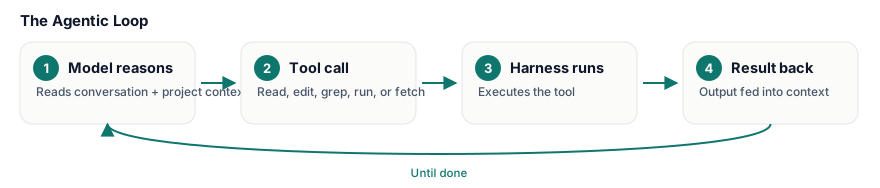
Each turn, the model receives the full conversation plus your project context, then emits either text or a tool call — read a file, run a shell command, edit a file, grep, fetch a URL. The harness executes the tool, feeds the output back, and the model runs again. There's no hidden intelligence beyond this. The agent feels capable because the loop compounds: a grep, then a Read, then an Edit, then npm test, each step informed by the last.
This is why specificity in the request changes the trajectory of tool calls. "Fix the auth bug" forces the model to spend turns discovering context. "The Supabase session is null in middleware.ts after the OAuth redirect — check the cookie handling" lets it jump straight to the right file.
Context is the budget you're actually managing
Everything the model knows lives in its context window: your messages, file contents it has read, tool outputs, and the CLAUDE.md files that auto-load. This is finite, and it degrades. Reading a 2,000-line generated migration to answer a one-line question burns budget you'll want later. Two production habits:
- Scope reads. Point the agent at the file and symbol, not the directory.
- Use
CLAUDE.mdas persistent, cheap context. Conventions, commands, and gotchas placed there load every session — far cheaper than re-explaining each time.
# Give the agent a fast, scoped feedback loop instead of a vague "make it pass"
npm run typecheck && npm run test -- src/lib/auth.test.ts
When the agent can run that itself, the loop self-corrects: it edits, runs the command, reads the failure, and edits again — no round trip through you.
Control: permissions, MCP, and the danger zone
Tools are the agent's hands, and you decide which hands it has. Allowlisting safe commands removes approval friction; everything irreversible should still prompt. MCP servers extend the toolset — the Supabase, GitHub, and Stripe integrations on this stack are MCP tools — and they inherit the agent's reach. That cuts both ways.
// .claude/settings.json — let the agent run reads freely, gate the rest
{
  "permissions": {
    "allow": ["Bash(npm run test:*)", "Bash(npm run typecheck)"],
    "ask": ["Bash(npx supabase db push:*)"]
  }
}
Pitfalls that bite in production
- The agent stops too early. If your test command isn't in context, it can't verify its own work. Always hand it the loop that proves "done."
- Stale context. After a big refactor, earlier file reads in the window are now wrong. Start a fresh session for the next task rather than fighting outdated state.
- Over-broad tools. A connected Stripe MCP pointed at a live account will act on a live account. Match tool authority to the blast radius you can tolerate.
The agent is only as good as the loop you build around it: tight feedback, scoped context, deliberate permissions.
⌨️ Exercise
Take a real bug in your Next.js app. Write a CLAUDE.md entry with your exact typecheck and scoped test commands, add them to the allow list in .claude/settings.json, then ask the agent to fix the bug and verify it. Watch the loop: count how many tool calls it makes before declaring done, and confirm it ran your test command unprompted.